Top4 University

Post-game coaching for Teamfight Tactics

A review of every game you play, read from your own screen.

Top4 University records your own game by screen capture, rebuilds it round by round, and after the game ends shows you where the gold, the levels and the health went.

Windows · Beta · Free

Download for Windows

Downloads the installer for Windows.

  • Windows 10 or 11, 64-bit.
  • TFT at 16:9 or 16:10.
  • Updates from inside the app, between games.
  • The installer is not code-signed, so Windows SmartScreen may warn. Choose More info, then Run anyway.
  • Not for players in Korea.
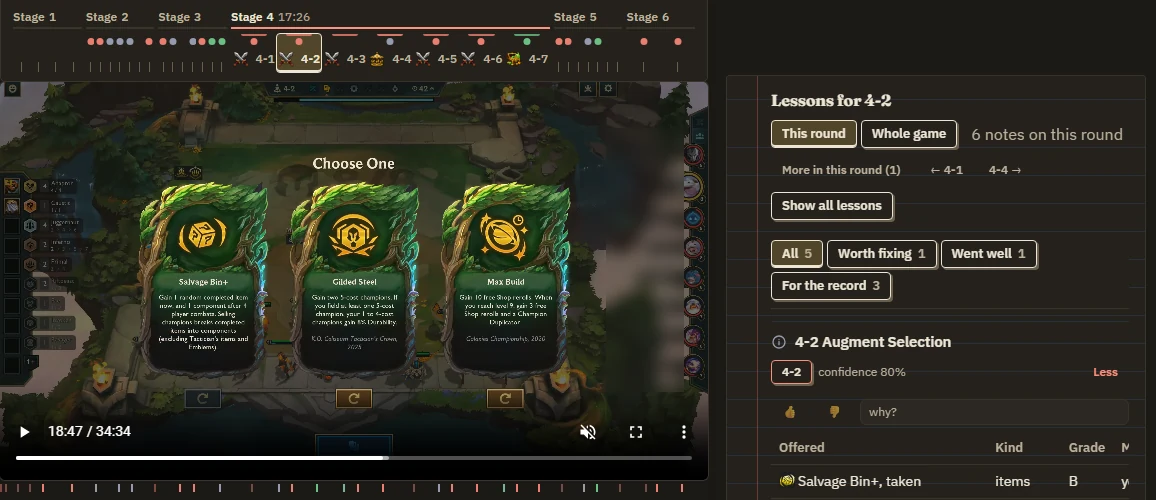
The Replay tab at round 4-2: the round strip over the recorded game, paused on the augment choice, and beside it the lessons for 4-2 with This round selected.
Play or jump to a round in the replay and the column beside it shows that round's findings.

How it works

  1. Play as normal

    It sits in the notification area and notices when a game starts. It gives no advice while you play.

  2. It reads the screen

    Gold, level, XP, round, the shop, the trait tracker, the player health list, and the units and items on your board and bench, all read from the game's own interface. A board the game shows you when you scout or fight a player is read too, for the review.

  3. Read the review afterwards

    Once the game ends you get its main lessons, a replay you can jump through with each round's findings beside it, and habits that repeat across your games.

What a review looks like

Screenshots from a real ranked game recorded by screen capture. Other players' names are blurred.


The This game strip above the replay: the game's main lessons grouped by theme, Items with 8 findings, Scouting with 3, Leveling and rolling with 9, each listing the rounds it cites, with Pin as next lesson and See more.
Each game opens on its main lessons, grouped by theme, each naming its rounds.
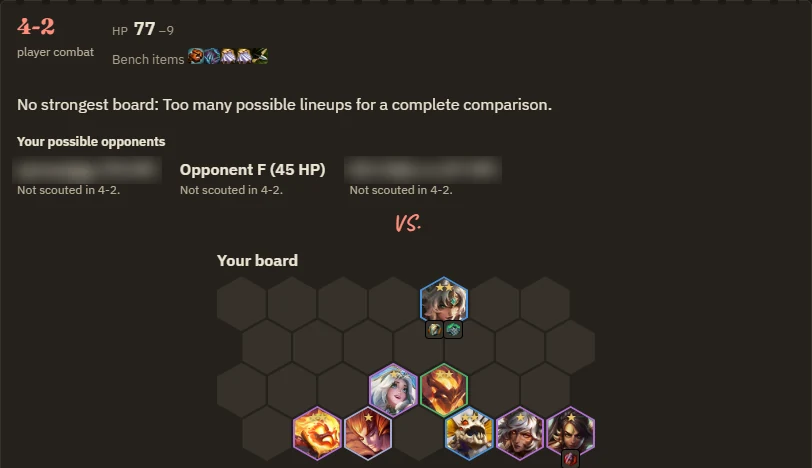
The round card for 4-2: 77 HP, the items on the bench, the three players you could have faced (names blurred here) and your board below.
Every round on its own: your health, your items, who you could face and your board, read from the game's own interface.
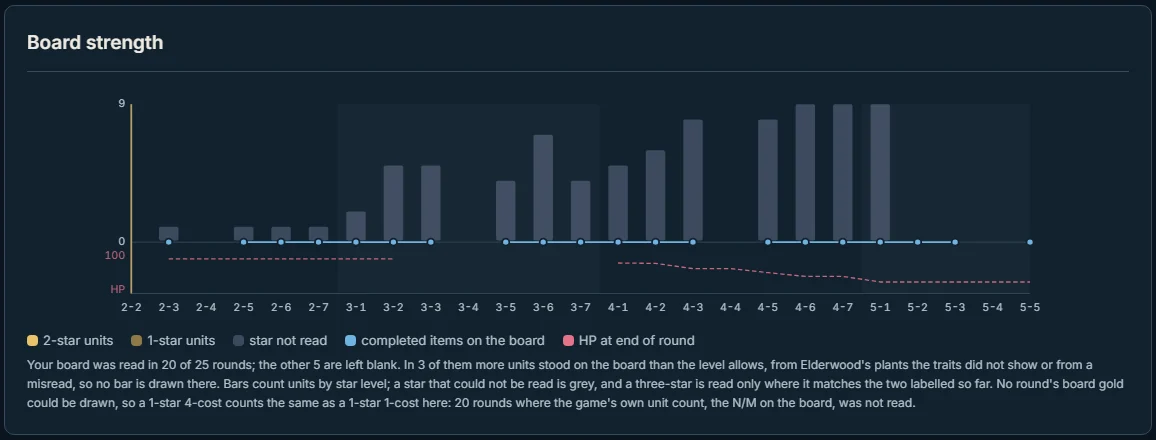
The board strength chart from 1-1 to 6-2: peak board gold 75, 9 units and 13 HP at the end, gold on the board climbing round by round, the HP line falling, and dotted stretches where a round was not read.
Your board's worth and your health, round by round; rounds it could not read are drawn dotted, not guessed.
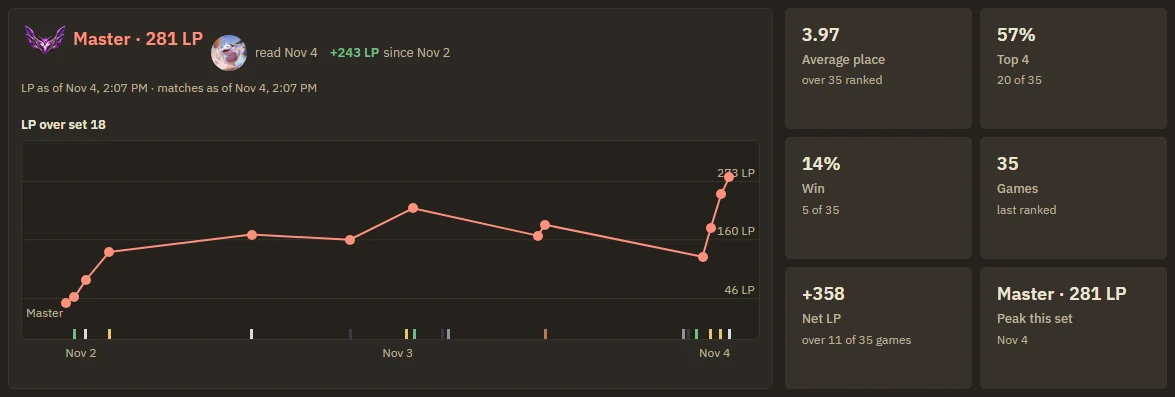
The Profile: Master 281 LP, LP over set 18, average place 3.97, top 4 in 20 of 35 games, 14% wins, net LP +358.
Your Profile adds up your ranked games: LP over the set, average place and top 4 rate.
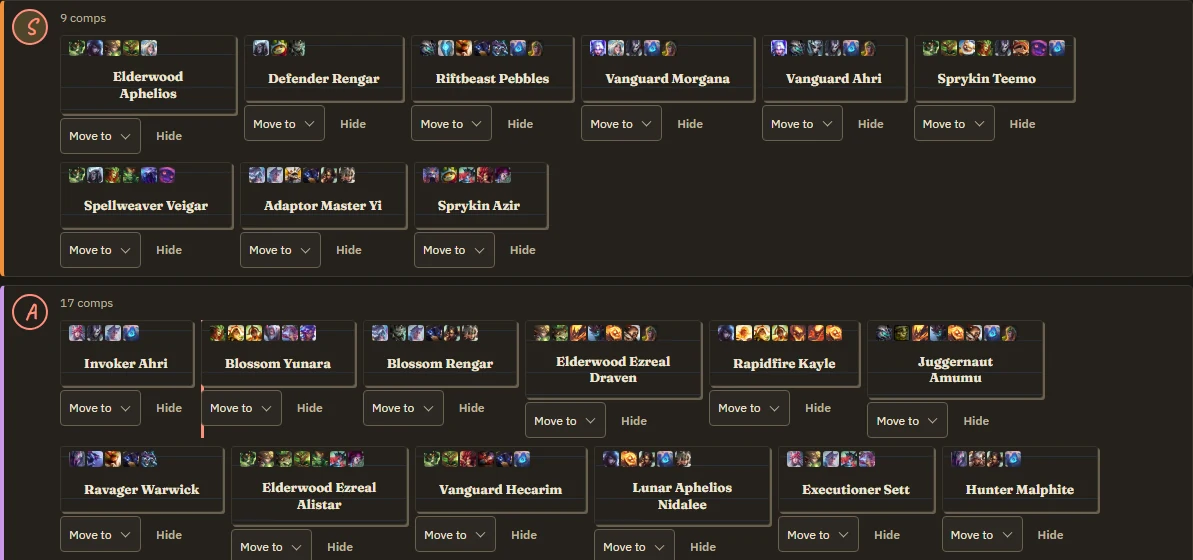
The Meta Comps tab: comps in S and A tiers, each card showing its units, with Move to and Hide.
Meta Comps lists comps by tier; right-click one to load it on the overlay.
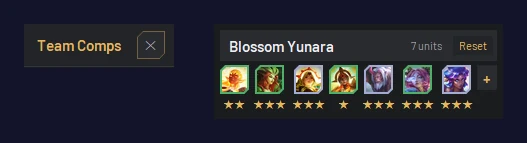
The overlay: a small Team Comps button, and a loaded comp, Blossom Yunara, as a panel of seven units with the star level set for each.
The Team Comps button, and a loaded comp as a panel at the top right of the screen.

It would rather say nothing than guess

Unread means unread

Gold it could not read is marked unknown, never zero. A check whose inputs were not read does not run, so it says nothing rather than guess.

Sums, not opinions

Interest paid at 1 gold per 10 held is arithmetic the game enforces. What level you "should" be is meta opinion; where the review uses one, it says where it came from and describes the difference instead of calling it a mistake.

Correct play is not a complaint

A committed roll-down is supposed to end low on gold, so those rounds are left out of the missed-interest count.

Your recordings stay on your PC

Built to stay on the right side of the rules

Screen capture only

No reading game memory, no injecting into any process, no automated input. From the League client it asks only when a game starts and ends, the queue type, who is playing on which server, and their ranked TFT standing.

Reviews after the game, never during

Riot's policy rules out advice that adjusts in real time during a game. The review is refused while a game is being recorded. The optional overlay is a small Team Comps button. Load a comp from the app and it marks that comp's units in your shop, and stops marking a unit once your own board and bench show it at the star level you set. It never says what to buy.

No opponent tracking in game

When you scout another board, the game's panels show that player's units, not yours. The app detects this and keeps those frames out of your own board. Nothing about opponents is shown while you play; what the game showed you of them appears only in the review afterwards.

Free to use

Recording, the replay, the round-by-round timeline and a short review of every game are free, and will stay free. An optional paid tier with deeper analysis may come later, and only after Riot's developer team has reviewed it.

Requirements

  • Windows 10 or 11, 64-bit.
  • TFT at a 16:9 or 16:10 resolution. Ultrawide is refused rather than read wrongly.
  • Not for players in Korea. Riot does not allow apps that use the League Client API to be used there, and this app uses it.